Wednesday, June 12, 2013

Create Dynamic Marketing List in CRM 2011 with C# .Net


If you want to create Dynamic Marketing List in CRM using C# please follow these steps

1. Create your Desired FetchXML using Advance Find in CRM.
2. Download that FetchXML.
3. Use that FetchXML in below code (Just replace " with ' )

your final code looks like

var service = new XrmServiceContext("Xrm");
            String fetchXml = @"<fetch version='1.0' output-format='xml-platform' mapping='logical' distinct='false'>
  <entity name='contact'>
    <attribute name='fullname' />
    <attribute name='telephone1' />
    <attribute name='contactid' />
    <order attribute='fullname' descending='false' />
    <filter type='and'>
      <condition attribute='address1_city' operator='eq' value='Florida' />
      <condition attribute='address1_country' operator='like' value='%USA%' />
    </filter>
  </entity>
</fetch>";


            // Create dynamic list. Set the type to true to declare a dynamic list. Set CreatedFromCode to 1 for account member type.
            List dynamicList = new List()
            {
                Type = true, //True for Dynamic List
                ListName = "Dynamic List", //Name of the List
                CreatedFromCode = 2, //1 For Account; 2 For Contact; 3 For Lead
                Query = fetchXml
            };
            Guid _dynamicListId = service.Create(dynamicList);
         
Advantages: Some companies uses marketing list very frequently for example they want different marketing list just with a address1_city change for this purpose we can use .Net to develop such type of Marketing lists easily.

I hope it helps someone :)

Wednesday, June 5, 2013

5 Ways to Import Large Data in Microsoft Dynamics CRM 2011

In this article, I have mentioned possible ways to import data in CRM 2011
There are five possible ways to import data in CRM. If I have missed any, please mention in Comments
  1. CRM 2011 import wizard
  2. Write your own web service using ExecuteMultipleRequest
  3. SSIS Packedge
  4. Use third party integration software like Scribe 
  5. Direct SQL Queries (Unsupported)
Which one is more efficient between these methods depends on your CRM structure, the source of your data, the complexity of the transformation, etc. Every possible solution has some advantages and some disadvantages. 


1.       CRM 2011 import wizard

We can use import wizard to import data in CRM 2011. It is very easy to use. Please follow steps to import data using import wizard.
Download template for the entity that you want to import in CRM

Open the downloaded file

 Fill the excel file with your data

Save the file and from ribbon select import data

This will open import wizard, Browse to your file and select your file as mentioned in below screenshot

Select your desire file and click on submit.

After few times the data will be, upload successfully.

Limitations:

We can’t import non-printable characters using above method.
If we want to Import any entity that has 1:N relationship we need to copy them in one zip file.
If you want to import Unicode data please use XML not Excel.
File size limit is upto 8 MB you can make chunk of data to import them in CRM.

2.       Write your own web service using ExecuteMultipleRequest

Please check my previous blog for this purpose

3.       SSIS Package

We can create SSIS Package to insert data in CRM 2011. Andrii Butenko One of MVP has already write an article on how to integrate CRM 2011 using SSIS. This is really good article so I mentioned it here

4.       Use third party integration software like Scribe.

Many third party tools available that can be used to import data in CRM. Scribe is one of them.

5.       Direct SQL Queries

We can also write SQL queries to insert data in CRM but it is unsupported and not recommended by Microsoft.

Limitations:

Writing direct SQL queries is not supported by Microsoft. One of the biggest disadvantage of using SQL queries is that you bypass Business logic.


I hope it helps someone :)
If you have any suggestion please comment.

Tuesday, May 28, 2013

When to use Email Template and when to Use Mail Merge Template


Mail merge templates are used to send bulk email to multiple users at a same time.
Mail merge templates could be used in following scenarios
     1. Birthday mails.
     2. Appointment letters
     3. Multiple Resignation Letters
Email Templates could be used in following scenarios
     1. New case assigned to a user
     2. New admission application received
     3. Some record needs approval


Here is the table for feature of both templates

Feature
Email Template
Mail Merge Template
Insert merge fields
X
X
Insert custom attribute lookup fields

X
Are available to send in bulk
X
X
Preview before sending in bulk

X
Edit before sending in bulk

X
Place content in the body of an email
X
X
Respect do not contact rules
X
X
Create personal or organization-wide template
X
X
Can be used in workflow
X

Can be created globally for use across multiple entities
X

Can be created for custom entities

X
Requires the Outlook client to create template

X

I hope it helps someone. J

Filter Sub Grid using JavaScript in CRM 2011

Please follow bellow steps to filter sub grid using JavaScript
1. Create FetchXML from Advance find view that you want to set in Sub Grid.
2. Note down the Grid Unique name (We need this in below JavaScript)

Copy the below JavaScript and made changes in BOLD section.

function updateSubGrid() {
    //This will get the related products grid details and store in a variable.
    var relatedAccounts = document.getElementById("YourGridName"); // Your Grid Unique Name
    //Initializing the lookup field to store in an array.
    var lookupfield = new Array;
    //Get the lookup field
    lookupfield = Xrm.Page.getAttribute("contactid").getValue(); // Filter Grid base on the lookup value
    //This will get the lookup field guid if there is value present in the lookup
    if (lookupfield != null) {
        var lookupid = lookupfield[0].id;
    }
    //Else the function will return and no code will be executed.
    else {
        return;
    }
    //This method is to ensure that grid is loaded before processing.
    if (relatedAccounts == null || relatedAccounts.readyState != "complete") {
        //This statement is used to wait for 2 seconds and recall the function until the grid is loaded.
        setTimeout('updateSubGrid()', 2000);
        return;

    }

    //This is the fetch xml code which display all the account associated with the contact.
    //Good Practice is to create FetchXML from Advance Find View and Make formating as mentioned below

    var fetchXml = "<fetch version='1.0' output-format='xml-platform' mapping='logical' distinct='false'>";
    fetchXml += "<entity name='account'>";
    fetchXml += "<attribute name='fullname' />";
    fetchXml += "<attribute name='boardname' />";
    fetchXml += "<attribute name='contactidid' />";
    fetchXml += "<order attribute='appointeestage' descending='false' />";
    fetchXml += "<filter type='and'>";
    fetchXml += "<condition attribute='statecode' operator='eq' value='0' />";
    fetchXml += "<condition attribute='contactid' operator='eq' uitype='contact' value='" + lookupid + "' />";
    fetchXml += "</filter>";
    fetchXml += "</entity>";
    fetchXml += "</fetch>";

    //Setting the fetch xml to the sub grid.
    relatedAccounts.control.setParameter("fetchXml", fetchXml);
    //This statement will refresh the sub grid after making all modifications.
    relatedAccounts.control.refresh();

}

Call updateSubGrid function onload of the form and publish the customization.
I hope it helps someone :)

Wednesday, March 20, 2013

Plugin Walkthrough using Visual studio 2012

Plugin Walkthrough using Visual Studio 2012.

 
Visual studio 2012 makes our life very easy after giving a Dynamics CRM toolkit that could be easily installed and could be used as mentioned here. After installing toolkit Visual studio gives us a new project type of Dynamics CRM. Here are the steps to create and deploy plugin for CRM 2011

Step 1:
Open visual studio click File-> New -> Project and From navigation menu select Dynamics CRM then select Dynamics CRM 2012 plug-in library and press OK.

Step 2:
Enter the credentials and press log on and if you successfully login you will see your organizations in drop down. Select your organization from dropdown and select solution from solution name dropdown box and press ok.
Step 3:
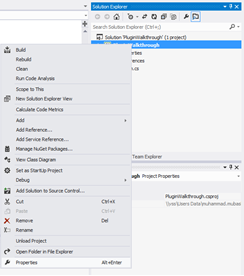
After pressing ok your project will created next step is to right click on your project and click on Properties as mentioned in above fig.
You will see a window with project properties and then click Signing and check Sign the assembly button enter your key file name and uncheck Protect my key file with a password check box.
Step 4:
Next step is to create Entities wrapper.
Right click on Entities in CRM Explorer bar and click on generate wrapper.
It will automatically generate a wrapper class for us we need to add the reference in our class only.
Open your Plugin.cs file and paste following code
Step 5:


using System;
using System.Diagnostics;
using System.Linq;
using System.ServiceModel;
using Microsoft.Xrm.Sdk;
using PluginWalkthrough.Entities;
 
public class Plugin : IPlugin
{
    public void Execute(IServiceProvider serviceProvider)
    {
        IPluginExecutionContext context = (IPluginExecutionContext)
        serviceProvider.GetService(typeof(IPluginExecutionContext));
 
        Entity entity;
 
        // Check if the input parameters property bag contains a target
        // of the create operation and that target is of type Entity.
        if (context.InputParameters.Contains("Target") &&
        context.InputParameters["Target"] is Entity)
        {
            // Obtain the target business entity from the input parameters.
            entity = (Entity)context.InputParameters["Target"];
 
            // Verify that the entity represents a contact.
            if (entity.LogicalName != "contact") { return; } // Write your entity name in which you want to trigger your plugin
        }
        else
        {
            return;
        }
 
        try
        {
            IOrganizationServiceFactory serviceFactory =
                (IOrganizationServiceFactory)serviceProvider.GetService(
            typeof(IOrganizationServiceFactory));
            IOrganizationService service =
            serviceFactory.CreateOrganizationService(context.UserId);
 
            var id = (Guid)context.OutputParameters["id"];
           
            //Write your business logic here
        }
        catch (FaultException<OrganizationServiceFault> ex)
        {
            throw new InvalidPluginExecutionException(
            "An error occurred in the plug-in.", ex);
        }
    }
 
 
}
Here you go your plugin is ready to build and for deploy. You can add your business logic in the plugin.

For deploying a plugin please check following link.
http://msdn.microsoft.com/en-us/library/gg309580.aspx


I hope it helps some one :)


Monday, February 25, 2013

How to publish all customization in CRM 2011 using .NET C#

I am developing a tool that creates attributes on runtime and I need to publish all the customization’s and for this purpose I am just exploring SDK and found this message request
"PublishAllXmlRequest" which is used to publish all customization in CRM 2011 here is the complete syntax I hope it help’s some one
J

PublishAllXmlRequest publishReq= new PublishAllXmlRequest();

service.Execute(publishReq);

Note: Make sure you have added a namespace Microsoft.Crm.Sdk.Messages;

Thanks

Case Study: Implementing MS Dynamics CRM 2011 for a Newsgroup


Case study (Newspaper group)
The purpose to write the blog is to tell the people that how Dynamics CRM improve the performance of a newspaper group. Recently I have an experience of working with a Multilanguage newspaper group based in UK. They care about their customers and they are much interested in implementing contract base system which uses very complex business roles and it has 10+ offices in different part of the world and has a lot of agents in all over the world.
Business needs
They have already running a system which is a custom desktop application it has a central database which is linked with all offices. But the application is start causing issues and is really difficult to upgrade or integrate with any system. The application does not support direct marketing list functionality and the main feature of marketing. The client is much interested in reliable fast and accurate system which must be less expansive and they must have good control on it.

Solution:
After consulting we decided to go for Dynamics CRM for Marketing and contract management and for financial management we decided to use Dynamics NAV. Dynamics CRM has a great feature of Marketing and contract system as a built in functionality. They need to store all the data in CRM and also wants old data in new system. And using the NAV contactor we can connect both CRM and NAV. Even If they want to implement other dynamics products it’s easy for them because Dynamics gives adaptor functionality for all the dynamics products.

Benefits for using Dynamics CRM
1. Dashboard
CRM Dashboards allow us to drilldown to the data due to this functionality a business can take more efficient and quick to respond to issues and new opportunities.
Executives can take decisions from dashboard visibility for example if any country has less revenue generated with comparison to the last month the executives will try to find the cause and focus on that country before anything goes in loss.

2. Contract management
After implementing dynamics CRM they can easily manage contracts and have better control on Marketing and pricing.
3. Expands the Agents

In newspaper group agents are great resource of profit. Using accounts and partner portal functionality we can increase agents as much as the newspaper industry can. And using contract management system we can distribute there commission easily. 4. Ad Management
We can use Product as Ad it’s easy for group to manage with contracts.
5. Availability of old data in new systemUsing import feature of Dynamics CRM we can easily migrate data to CRM from any old system.
6. ReportingReporting is really easy in CRM anyone who has a little knowledge about CRM can easily develop reports.
7. Easy to useDynamics CRM has office type UI so if any one who is familiar with office can easily and quickly learn CRM.


This is an open blog any one can share his/her idea's in comments and they are highly appreciated.

Thanks :)