Wednesday, March 28, 2012

Debugging in IE 8 and 9 for CRM 2011

Press F12 in IE 8 and 9.

For Java script debugging  in IE9 press F12

Before start debugging please Enable Script Debugging first.

Open an IE browser and make sure in:
Tools - Internet Options - Advanced - Browsing
Disable script debugging (Internet Explorer) is unchecked

For More help
IE 8 JavaScript Debugger
http://msdn.microsoft.com/en-us/ie/dd699458
IE 8 JavaScript Profiler
http://msdn.microsoft.com/en-gb/ie/dd490714
IE 9 Developer Tools
http://msdn.microsoft.com/en-gb/ie/hh545573


Thanks

Tuesday, March 27, 2012

CRM 2011 Privileges in Sitemap Hiding

Hiding Settings and Resources from sitemap for all the users except Administrator, System Customizer.
We could not edit sitemap directly on security privileges for this purpose we use a small trick.
We will follow these step to accomplish our task.
1) Create a new entity
2) Give read access to administrator and system customizer role
3) Download SiteMap.
4) Edit SiteMap add this line
<Privilege Entity="account" Privilege="Read" /> I will explain this below.
5) Upload again The Site map.


Let Start.
1) Create a new entity and name it RoleHideSettingsResource. (new_RoleHideSettingsResource).
2) Give read access to Administrator and customizor (Check any other user dont have read privilege to this entity.
by Default only Administrator and customizor has the read privilege.
3) Download the site map using this tool sitemapeditor. Its very easy to use

4) Click on Save SiteMap (sitemap.xml)
5) Open the SiteMap in any editor Tool ( I am using visual web developer)


6) NOW THE MAIN PARTS COMES Locate tag

 <Area Id="Settings" ResourceId="Area_Settings" ShowGroups="true" Icon="/_imgs/settings_24x24.gif" DescriptionResourceId="Settings_Area_Description">


7) Under every <SubArea> add this line
 <Privilege Entity="new_RoleHideSettingsResource" Privilege="Read" />

8) Your first Area looks like this
<Group Id="Business_Setting" ResourceId="Menu_Label_Business" DescriptionResourceId="Menu_Label_Business">
      <SubArea Id="nav_businessmanagement" ResourceId="Homepage_BusinessManagement" DescriptionResourceId="BizManagement_SubArea_Description" Icon="/_imgs/ico_18_busmanagement.gif" Url="/tools/business/business.aspx" AvailableOffline="false">
        <Privilege Entity="new_RoleHideSettingsResource" Privilege="Read" />
      </SubArea>
      <SubArea Id="nav_template" ResourceId="Homepage_Template" DescriptionResourceId="Template_SubArea_Description" Icon="/_imgs/ico_18_templates.gif" Url="/tools/templates/templates.aspx" AvailableOffline="false">
        <Privilege Entity="new_RoleHideSettingsResource" Privilege="Read" />
      </SubArea>
      <SubArea Id="nav_productcatalog" ResourceId="Homepage_ProductCatalog" DescriptionResourceId="ProductCatalog_SubArea_Description" Icon="/_imgs/ico_18_productcatalog.gif" Url="/tools/productcatalog/productcatalog.aspx" AvailableOffline="false">
        <Privilege Entity="product" Privilege="Read" />
        <Privilege Entity="new_RoleHideSettingsResource" Privilege="Read" />
      </SubArea>
    </Group>

9) Save the file
10) Click on open siteMap
 11) And Than Update SiteMap


Conclusion:
Now only Administrator and system customizor could see Settings and resource center tab.
Thanks and if you need some more help please comment here.

Wednesday, February 15, 2012

CRM 2011 - Form errors when opening non customised forms (object doesn't support property or method 'Form load')

You may experience the following error across a number of default entities after installing CRM 2011 on a new server. The errors occur despite having made NO customisations:
There was an error with this field's customized event
Field: window
Event: onload
Error: object doesn't support property or method 'Form load'
Within a fiddler trace, you may see the following:
401 http://<crmserver>/<myorg>/%7B634443390830000000%7D/WebResources/Ribbon_main_system_library.js
404 http://<crmserver>/<myorg>/%7B634443390830000000%7D/WebResources/Ribbon_main_system_library.js
When a Web Resource is requested from the CRM server, a URL is built dynamically. For that, CRM uses a component (that gets installed with CRM) called “Microsoft URL Rewrite 1.1 for IIS 7”, together with a rule that you can see inside the CRM Web site configurations under the URL Rewrite section called “WebResourcesRule”.
It has been seen that in some circumstances the Microsoft URL Rewrite Module does not get loaded properly and/or the rewrite rules are missing. The following can be done to check this:
1)
-Launch IIS Manager on the CRM server
-Select the CRM Website
-Double click Modules under IIS heading
-Verify RewriteModule is listed in the list here and is associated with the following DLL: %SystemRoot%\System32\Inetsrv\rewrite.dll
2)
-Launch IIS Manager on the CRM server
-Select the CRM Website
-Double click URL Rewrite under the IIS heading
-Verify that 3 rules exist here (ClientGlobalContectRule, WebResourcesRule, FederationMetadataRule)
If one or both of the above does not appear correct, then you should perform the following:
A) Make sure that Kernel-mode authentication is enabled:
-Launch IIS Manager on the CRM server
-Select the CRM Website
-Double click Authentication under the IIS heading.
-Select 'Windows Authentication'
-Click on Advanced Settings in the right hand Actions pane.
-Confirm 'Enable Kernel-mode authentication' is marked.
B) Repair or Reinstall the URL RewriteModule:
- The installation msi for the Microsoft URL RewriteModule can be found within the CRM server installation media under a folder called UrlRewriteModule. The file is called rewrite_1.1_amd64_rtw.
- Reboot the CRM Server after reinstalling the module.
When the module is correctly installed, the CRM website web.config file should be automatically updated. To verify this open the CRM website web.config file and make sure the following element is present under <rewrite>.
</security>
<rewrite>
<rules>
<rule name="ClientGlobalContextRule" stopProcessing="true">
<match url="/?([0-9a-zA-Z][^/]*)?/?((?:%7b|\{)[^/]*(?:%7d|\}))?/?(WebResources|Handlers)/ClientGlobalContext.js.aspx" />
<action type="Rewrite" url="/{R:1}/_Common/ClientGlobalContext.js.aspx" />
</rule>
<rule name="WebResourcesRule" stopProcessing="true">
<match url="/?([0-9a-zA-Z][^/]*)?/?((?:%7b|\{)[^/]*(?:%7d|\}))?/?webresources/([^\\?]+)" />
<action type="Rewrite" url="/{R:1}/Handlers/WebResource.ashx?name={R:3}" />
</rule>
<rule name="FederationMetadataRule" stopProcessing="true">
<match url="FederationMetadata/2007-06/FederationMetadata.xml" />
<action type="Rewrite" url="/Handlers/FederationMetadata.ashx" />
</rule>
</rules>
</rewrite>
</system.webServer>

Microsoft URL Rewrite Module 1.1 for IIS 7 (x64) can be downloaded from below:
http://www.microsoft.com/download/en/details.aspx?displaylang=en&id=16784

Best Regards
Mubasher Sharif

Monday, January 30, 2012

Security Roles, when assigned to a user or a team, determine what users can and cannot do in a Dynamics CRM organization. Security roles are probably the most complex concept in the Dynamics CRM security model. I wrote an article an earlier article about the related concepts of business units, users and teams, but security roles deserve their very own article, and here it is. Also, this article was prompted in part by a question I got from a reader, so Chandon, if you’re reading this, skip to the end for the answer to your question!

Security Role Basics

I’ll start with a few basic facts about security roles. For the most part, security roles determine the access level a user has for privileges on every entity in Dynamics CRM. So what does that mean?

  • Privileges are the verbs in CRM: Create, Read, Write, Delete, Append, Append To, Share, Assign.
  • Access levels, from most to least generous: organization, parent-child business unit, business unit, user, none.
  • Entities are the units to which a security role applies an access level for every privilege.

This three-dimensional model is what accounts for the very colorful and initially somewhat overwhelming security role UI. The following two figures show the most generous and least generous out-of-the-box user security roles:

The CEO-Business Manager Security Role, Core Records Tab


The Salesperson Security Role, Core Records Tab

The Salesperson role is more interesting since it consists of things other than just completely filled in green circles, so I’ll explain these concepts in terms of this role. I’ll provide some examples to illustrate the trickier concepts.

Privileges

  • Create: Create a new record
  • Read: Read access to a record (if you search for it in Advanced Find or a data grid, can you see it?)
  • Write: If you have a record open on a form, can you make changes and save them?
  • Delete: The easiest one to understand!
  • Append: Can you append this record to any other record? Example: if you don’t have any append privileges for the Contact entity, you cannot associate any contact record with a parent account.
  • Append To: Can you append any other records to this record? Example: if you don’t have any append to privileges for contacts, you cannot associate notes or activities to contact records.
  • Assign: can you change the owner of a record?
  • Share: can you override the security model by sharing a record with somebody who otherwise wouldn’t have access to it?

Entities

These are the y axis, and it’s the intersection of these and the privileges on the x axis that determine how much of any particular privilege you have for a specific entity. Notice that the Core Records tab contains the customer (account and contact) entities, along with the “potential customer” entity (lead). It also contains Opportunity (not displayed in the figures, but it’s there!), Activity, Note, and a lot of other things.

Access Levels

Since it’s the intersection of the entity and the privilege that determines what you can do, I highlighted the Contact row in the figure. For most entities – all record types that can be assigned to a user, the so-called “User-Owned” entities – there are five access levels for each privilege, from least to most generous:

  • None: The easiest to understand: you cannot do it!
  • User: You can do it for records you own. Notice that the Salesperson role has user-level delete privilege for contacts. By default, a user assigned to this role can delete contact records assigned to them, so if you don’t want this, empty out the circle to set it to None.
  • Business Unit: From User to Business Unit is a big jump, since it broadens out to include any record you own, plus any record owned by anybody else in your business unit. This is also the intersection between business units and security.
  • Parent-Child Business Unit: This one only matters if your business unit structure is complex enough to have parent and child business units. If it is, the jump from Business Unit to Parent-Child Business Unit extends your access level down to any BU that is a child of the one you are assigned to.
  • Organization: Also easy to understand, organization-level access means you can do it for any record owned by anybody in the organization. For example, notice that the account, contact and lead entities all have organization-level read privilege even in the least generous security role. Lots of organizations don’t want this level of visibility for a low-level security role, and thus might dial this back a little bit.

Customizing Security Roles

I’ve mentioned a few examples where many organizations will customize the default security roles. This topic has a few important basic facts of its own, such as:

  • If you create new (that is, non-default) business units in your Dynamics CRM organization, every one you create will be a child of the root (default) business unit.
  • That’s important for security roles, because every new business unit you create will inherit all of the security roles of its parent business unit. That is, security roles live at the business unit level, and any time you create a business unit, every security role of the parent is pushed down as an inherited role.
  • And in turn, that’s important because inherited security roles can neither be deleted nor modified.

You might compare Dynamics CRM business units to sites in a SharePoint site collection: in SharePoint you can “break” security in a sense, configuring a child site in a collection to NOT inherit security from its parent site. You cannot do this in Dynamics CRM.

For example, the security roles shown in the above figures were security roles for the root business unit, so if you wanted to make changes to them and apply those changes to any existing child business unit (or any child business unit that might ever be created in the organization), you could do that. But…if you’re careful you can select a child business unit in the security role data grid, like this:
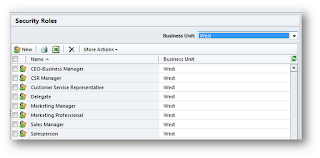

If you do that and open up one of the security roles, you will see something like the following:
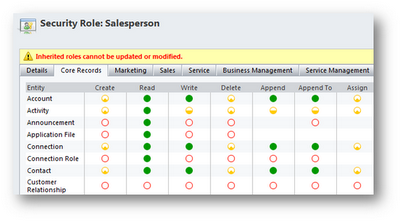
The scary red text tells you what you need to know! So what does this mean for customizing security roles? Here are some of the most important implications:

  1. If you want to customize an existing security role, you can only customize it in the business unit it was created in. So make sure to select the business unit in the Business Unit drop-down as in the previous example.
  2. If you do customize a role, the changes you make will cascade down to all existing or future child business units.
  3. If you want to create a new security role and have it available for every business unit in your CRM organization, create it at the root business unit.
  4. If you want to create a new security role and have it available only for a specific business unit, make sure to create it only after selecting the business unit in the Business Unit drop-down!

I get questions having to do with this last point a lot, so I’ll emphasize it here. If you click the New button in the following figure, you will be creating a new security role that lives in the West business unit. It will not be in the parent business unit or any peer business units.

On the other hand, the following figure shows the security roles for the root business unit (note that the organization name is the same as the business unit – that’s how you can tell, provided you haven’t changed the name of the root business unit!). If you click the New button with the root business unit selected, the security role will push down to any child b.u.’s as an inherited role, and you will only be able to customize it at the root b.u.

Create a New Role, or Copy an Existing role?

Finally, if you do need a new role, there are two ways to create it:

  • You can click the New button.
  • Alternatively, you can select an existing role, click the More Actions drop-down and select Copy Role…

Generally it’s better to select a role that’s close to what you want and copy it. If you create a new role from scratch you might freeze up when you see this:


Just remember: whether you’re creating a new role from scratch or copying an existing role, make sure you’ve got the right business unit selected in the drop-down before you do. Security roles are definitely hard-wired into the business unit they’re originally created in, so you have to be in the business unit the role is for before you create it!

Security Roles in CRM 2011: What’s Different?

The core functionality of security roles is essentially the same in Dynamics CRM 2011 as it was in 4.0. For example, everything I said above in the current article works the same for 2011 as it did in 4.0 (with the exception of being able to rename business units in the new version).

But that being said…there are significant differences in the overall security model. How can that be? Turns out there’s more the security than just the “how security roles work” question. Two of the most important areas of difference in comparing the two versions:

  • There are a lot more entities to which security needs to be applied. For example, charts and dashboards didn’t exist in CRM 4.0, and now that they do…we need security for them. Here’s an article I wrote on on example of that: Charts and Dashboards: who can see what?
  • Teams are now a full-fledged security principle — that is, records can be directly assigned to teams. Here’s a short article I wrote on that topic: Managing Users, Teams and Security.
These are both important topics, and big enough ones to deserve more detailed treatment than those articles. More coming soon!

Wednesday, December 21, 2011

Add Multiple Entities (Members) to a Marketing List in Microsoft Dynamics CRM 2011 Using .NET or Jscript

This illustration shows how to add a list of entities (members) to a marketing list in Microsoft Dynamics CRM 2011 with AddListMembersListRequest. This example will be given in Jscript (SOAP) and in C# (.NET).

Note: The entity type you add to your marketing list must be consistent with the entity type for the list and must be either an account, contact, or a lead.
Ok, here is what the code looks like!
First in C#:

AddListMembersListRequest req = new AddListMembersListRequest();
req.ListId = new Guid("6CAC04FC-930F-E111-8DB2-1CC1DEF1B5FF");
//add the new list of marketing list memnbers
req.MemberIds = new System.Guid[2];
req.MemberIds[0] = new Guid("DCB265C9-5F0C-E111-BF0B-1CC1DEE89AA8");
req.MemberIds[1] = new Guid("E4B265C9-5F0C-E111-BF0B-1CC1DEE89AA8");
AddListMembersListResponse resp = (AddListMembersListResponse)service.Execute(req);


Now here is the Jscript nicely formatted by the CRM 2011 SOAP formatter. Available at: http://crm2011soap.codeplex.com/

Now in Jscript


if (typeof (SDK) == "undefined")    { SDK = { __namespace: true }; }        //This will establish a more unique namespace for functions in this library. This will reduce the         // potential for functions to be overwritten due to a duplicate name when the library is loaded.        SDK.SAMPLES = {            _getServerUrl: function () {                ///                /// Returns the URL for the SOAP endpoint using the context information available in the form                /// or HTML Web resource.                ///                var OrgServicePath = "/XRMServices/2011/Organization.svc/web";                var serverUrl = "";                if (typeof GetGlobalContext == "function") {                    var context = GetGlobalContext();                    serverUrl = context.getServerUrl();                }                else {                    if (typeof Xrm.Page.context == "object") {                          serverUrl = Xrm.Page.context.getServerUrl();                    }                    else                    { throw new Error("Unable to access the server URL"); }                    }                   if (serverUrl.match(/\/$/)) {                        serverUrl = serverUrl.substring(0, serverUrl.length - 1);                    }                     return serverUrl + OrgServicePath;                },             AddListMembersListRequest: function () {                var requestMain = ""                requestMain += "";                requestMain += "  ";                requestMain += "    ";                requestMain += "      ";                requestMain += "        ";                requestMain += "          ";                requestMain += "            ListId";                requestMain += "            6cac04fc-930f-e111-8db2-1cc1def1b5ff";                requestMain += "          ";                requestMain += "          ";                requestMain += "            MemberIds";                requestMain += "            ";                requestMain += "              dcb265c9-5f0c-e111-bf0b-1cc1dee89aa8";                requestMain += "              e4b265c9-5f0c-e111-bf0b-1cc1dee89aa8";                requestMain += "            ";                requestMain += "          ";                requestMain += "        ";                requestMain += "        ";                requestMain += "        AddListMembersList";                requestMain += "      ";                requestMain += "    ";                requestMain += "  ";                requestMain += "";                var req = new XMLHttpRequest();                req.open("POST", SDK.SAMPLES._getServerUrl(), true)                // Responses will return XML. It isn't possible to return JSON.                req.setRequestHeader("Accept", "application/xml, text/xml, */*");                req.setRequestHeader("Content-Type", "text/xml; charset=utf-8");                req.setRequestHeader("SOAPAction", "http://schemas.microsoft.com/xrm/2011/Contracts/Services/IOrganizationService/Execute");                var successCallback = null;                var errorCallback = null;                req.onreadystatechange = function () { SDK.SAMPLES.AddListMembersListResponse(req, successCallback, errorCallback); };                req.send(requestMain);            },        AddListMembersListResponse: function (req, successCallback, errorCallback) {                ///                /// Recieves the assign response                ///                ///                /// The XMLHttpRequest response                ///                ///                /// The function to perform when an successfult response is returned.                /// For this message no data is returned so a success callback is not really necessary.                ///                ///                /// The function to perform when an error is returned.                /// This function accepts a JScript error returned by the _getError function                ///                if (req.readyState == 4) {                if (req.status == 200) {                if (successCallback != null)                { successCallback(); }                }                else {                    errorCallback(SDK.SAMPLES._getError(req.responseXML));                }            }        },        _getError: function (faultXml) {            ///            /// Parses the WCF fault returned in the event of an error.            ///            ///            /// The responseXML property of the XMLHttpRequest response.            ///            var errorMessage = "Unknown Error (Unable to parse the fault)";            if (typeof faultXml == "object") {                try {                    var bodyNode = faultXml.firstChild.firstChild;                    //Retrieve the fault node                    for (var i = 0; i < bodyNode.childNodes.length; i++) {                        var node = bodyNode.childNodes[i];                        //NOTE: This comparison does not handle the case where the XML namespace changes                        if ("s:Fault" == node.nodeName) {                        for (var j = 0; j < node.childNodes.length; j++) {                            var faultStringNode = node.childNodes[j];                            if ("faultstring" == faultStringNode.nodeName) {                                errorMessage = faultStringNode.text;                                break;                            }                        }                        break;                    }                }            }            catch (e) { };         }         return new Error(errorMessage);      },  __namespace: true };  

Now you can call the SDK.SAMPLES.AddListMembersListRequest function from your form jscript handler.


Thats all there is to it!
-